COMMERCIAL INVOICE
The value
What is billed and on which lines. The document the tax classification rests on.
IMPORTS
The commercial invoice, the packing list, the CMR, the delivery note and the bill of lading are all in one place. Fintray ties them together by the shipment reference and the order, and the file shows you what is missing.
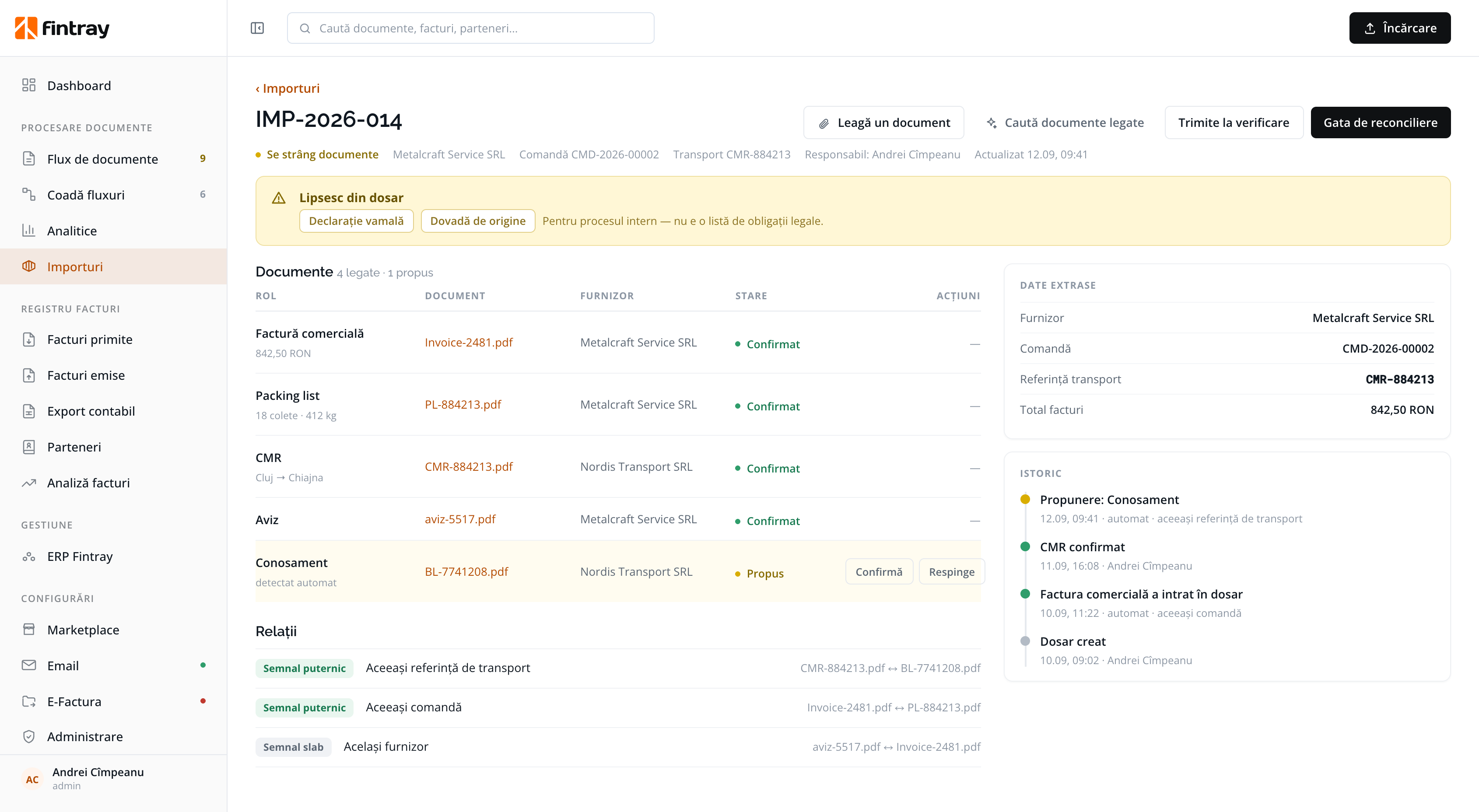
A file in progress: four confirmed documents, one proposed automatically from the same shipment reference, and two missing documents required by the internal process, not by law.
ROLES IN THE FILE
Fintray recognises the type of each document and the information it confirms: the quantity received, the route of the goods, or the value invoiced.
What is billed and on which lines. The document the tax classification rests on.
The number of packages and the weight, compared against the data on the invoice.
From where to where, with which carrier and under which reference. This is where the strongest link between documents comes from.
Proof of actual receipt, the document the invoiced quantity is compared against.
RELATIONSHIPS
The same shipment reference is a strong signal. The same supplier, a week apart, is not signal enough. Fintray shows the strength of each link, instead of treating every signal the same.
WHAT IS MISSING
The customs declaration and the proof of origin show up as missing because your own internal process asks for them. Fintray is explicit here: the list does not represent legal obligations, and it does not replace customs advice.
For the internal process: it does not represent legal obligations.
Who created the file, what entered automatically and on what basis, what a person confirmed and when. The log is appended to, never rewritten.
WHY IT MATTERS ON IMPORTS
Invoices available through RO e-Factura can be taken in as structured XML. Foreign documents often arrive as PDFs, and there simply pulling the data off the page is not enough.
Which set of rules applies, right from the start.
The same supplier can bill both on a single document.
Who accounts for the VAT, and under which article.
The return is filed monthly, and it goes wrong at line level.
Validity is checked on the invoice date, not only on the day of the check.
It happens, and it is not recovered the easy way.
The last rate published on the invoice date or before it.
Automatic, with reservation, or needs human review. Cases the rules cannot settle are not handled by guesswork.
The details of the 42 rules and of the full specimen are on the document processing page.
Each new document is proposed for the file it belongs to, from the shipment reference or the order.
A person confirms what was proposed automatically and rejects what does not belong in the file.
The invoiced value, the quantity that arrived and the order are compared against each other, with the original document one click away.
Confirmed, with the decision trail kept beside the record.
The invoice, the packing list, the CMR and the delivery notes from a real import. We build the file and show you what it matched automatically, what it proposed for confirmation, and what it left for a person.
Schedule a demo